Settings: Users
Local user accounts. The stored role is not enforced — Core's authorization is flat.
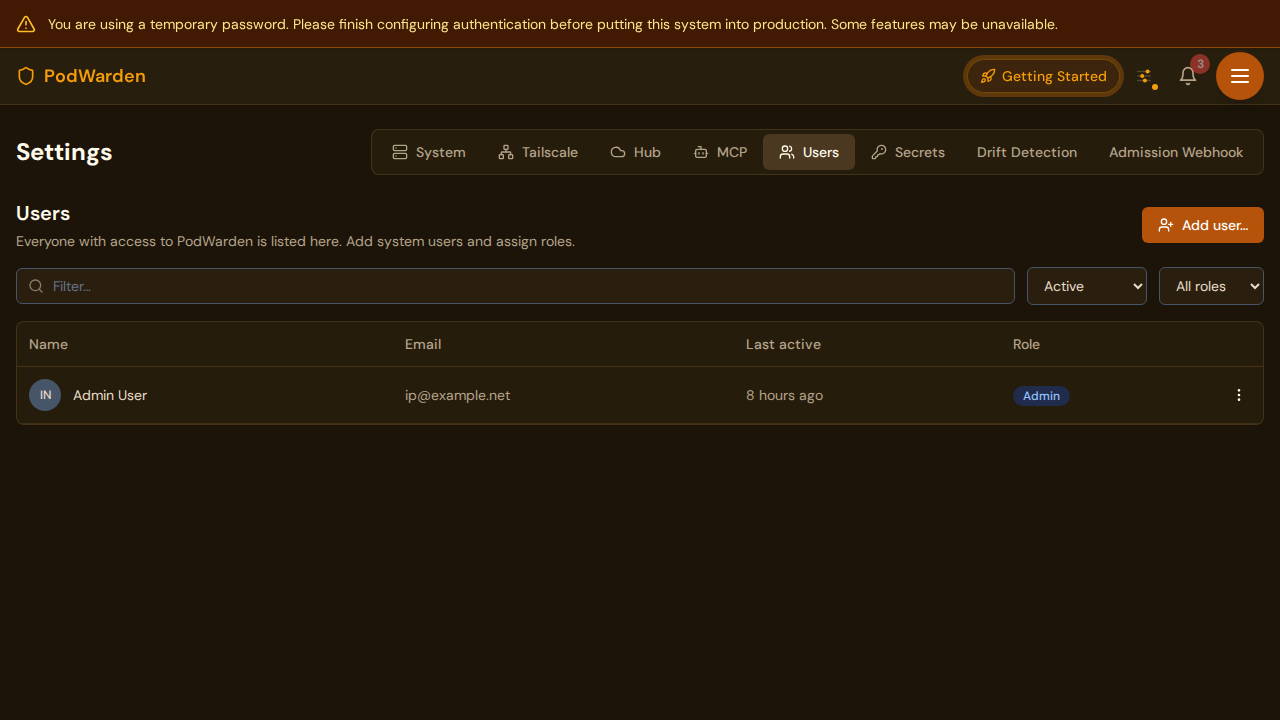
What you see
URL: /settings (Users tab)
The Users tab manages local user accounts for your PodWarden instance. These accounts are used for local authentication (email + password). Each carries a stored role, but it is not enforced — see Roles below. Users who sign in via OIDC are provisioned automatically on first sign-in and appear in this list.
Fields / columns
| Column | Description |
|---|---|
| The user's email address (used as login identifier) | |
| Name | Display name |
| Role | Stored value: readonly or admin (see roles below — not currently enforced) |
| Last login | Timestamp of the user's most recent sign-in |
Available actions
| Action | Where | What it does |
|---|---|---|
| Create | Users tab toolbar | Opens the user creation form. Specify email, name, role, and initial password |
| Edit role | User row | Change the user's role between readonly and admin |
| Delete | User row | Removes the user account. The user can no longer sign in locally |
| Set password | User row | Resets the user's password to a new value |
Roles
Every user has a stored role field (readonly or admin), but it is not
enforced. PodWarden Core's authorization model is flat: every authenticated
user has the same access, including user management, system settings, secret
values, and destructive operations (wipe host, delete cluster).
Earlier releases had a real operator/viewer/admin permission matrix,
then a binary model that actually restricted access as described below.
Neither is enforced today — treat anyone who can sign in as having full
access.
| Role | Historical meaning (not currently enforced) |
|---|---|
| readonly | Read access to all pages; cannot make changes; excludes secret values |
| admin | Full access to everything |
How OIDC users get an account
Role bindings and the SSO group-mapping reconciler have been removed. Earlier releases maintained per-user user_roles bindings, split into SSO-managed (is_sso_managed = true, written by an OIDC group-mapping reconciler) and manual. That table and that reconciler are gone — see Settings — SSO Group Mappings.
What happens today: the first time a user signs in via OIDC, PodWarden creates a system_users row for them with the stored role readonly. Group claims influence nothing — there is no mapping to configure and no reconciler to run. Any subsequent change of role is made by hand from this panel, and, because the role field is not enforced, does not change what the user can do in any case.
Restrict who may reach the instance at your identity provider. There is no in-product mechanism that grants some SSO users less access than others.
Notes
- At least one admin account must exist at all times. PodWarden prevents deleting the last admin.
- OIDC users appear in this list after their first sign-in. Their email and name come from the identity provider.
- Password changes take effect immediately. Active sessions are not invalidated.
- Suspending a user prevents them signing in. (Earlier releases also reaped their SSO-managed role bindings; those bindings no longer exist.)
Related docs
- Login -- How users authenticate
- Settings -- System -- Configure OIDC for SSO authentication
- Settings -- SSO Group Mappings -- Retired feature; what OIDC provisioning does today
- Settings -- MCP -- Previous settings tab
- Settings -- Secrets -- Next settings tab